
When to leave for work, from today's traffic
Updated · TIT
Leave at your arrival time minus the drive in the traffic expected when you'll be on the road, minus a buffer. Arrive 09:00, 34 minutes in Monday traffic, a 5-minute buffer: leave at 08:21. Mosey does this sum for your route every morning, keeps checking live traffic until you go, and reminds you when it's time.

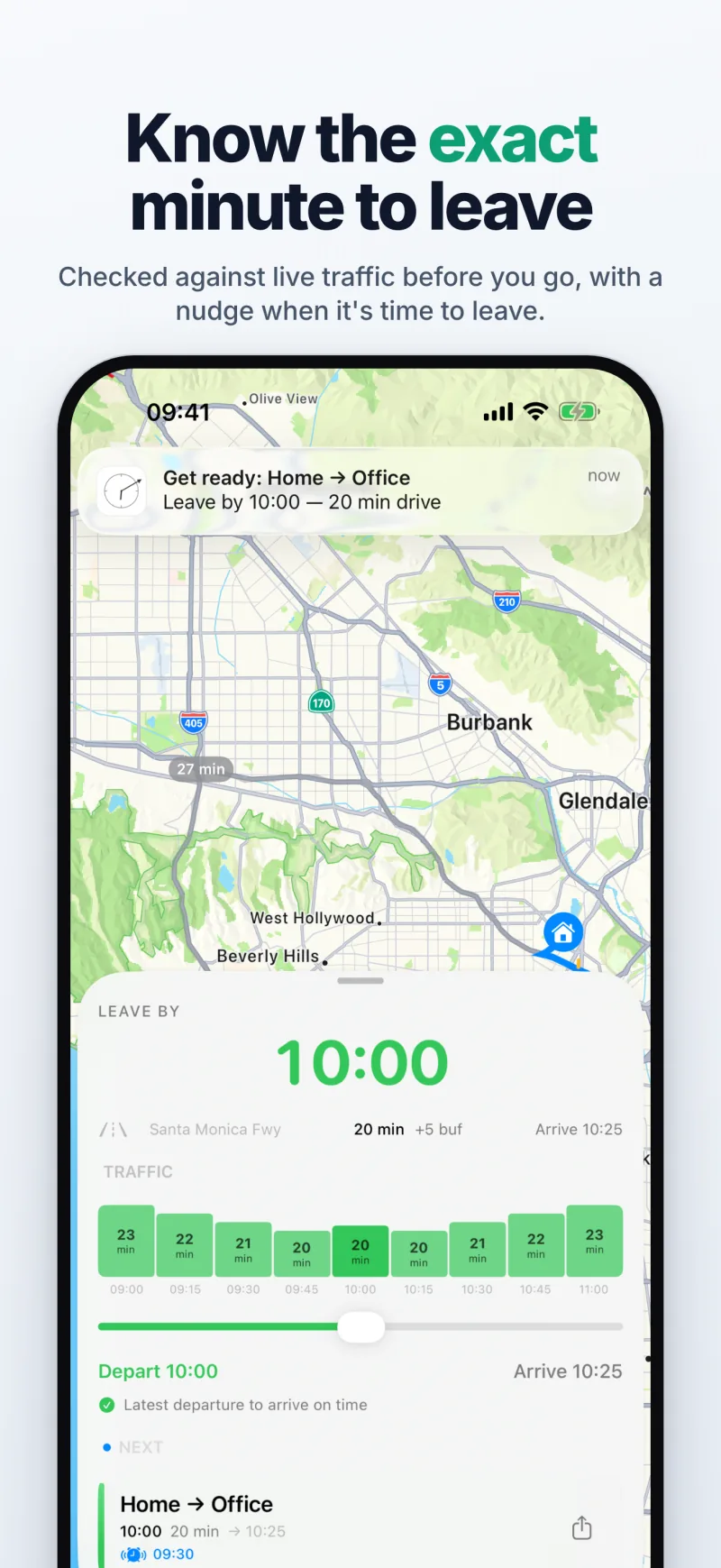
One arrival time, a different leave-by every day
Add a commute once: where you're going, when you need to be there and on which days. Mosey asks Apple Maps for the drive time with the traffic expected at the moment you'd be driving, not the traffic right now, subtracts it and your buffer from the arrival time, and shows the result on the home screen as LEAVE BY — the latest departure that still gets you there on time.
Say you start work at 09:00 and keep a 5-minute buffer. While you fill the route in, a live summary already shows the plan — "34 min in Monday traffic → leave 08:21 · alarm 07:51" — so you see what Mosey will do before you save: 09:00 minus 34 minutes of driving and 5 of buffer is 08:21, and the wake-up alarm, on the first reminder, rings 30 minutes before that.
Checked through the morning
From about half an hour before your first reminder — an hour before the leave-by with the default reminders — Mosey's server checks the live traffic on your route every fifteen minutes, then every five as the leave-by gets close. When the drive gets longer, the leave-by moves earlier; when the roads clear, it moves back.
Reminders arrive at the times you set for each route — by default 30, 10 and 2 minutes before the leave-by, and anywhere from an hour ahead to the minute you leave. The last one says "Leave now". If traffic on your route is unusually bad, a separate heads-up tells you so. If you'd rather be woken than reminded, the first reminder can ring as a real alarm that moves with the leave-by — more on the page “A wake-up alarm that adjusts to the traffic”.
Weather and a buffer of your own
Rain, snow and fog slow a commute before any jam shows up in the traffic data, so Mosey adds to the expected drive time when the weather at your starting point calls for it: 10% for light rain, 25% for heavy rain, 15% for fog and 40% for snow. Turn the weather adjustment off per route if you prefer the raw figure.
The buffer is yours: a few minutes added on top of the calculated drive, per route, for parking, the walk from the car park, or simply not wanting to arrive on the dot.
Tomorrow's forecast and how today went
The evening before, the home screen already shows tomorrow's plan from the typical traffic for that weekday, with a forecast of how the drive is likely to look. Over time each route builds a history: the average drive, your best and worst days.
After each commute a short summary tells you when you arrived and how traffic compared with usual. On Sunday evening a weekly recap adds it up — your commutes, the average drive and the slowest day. Both are notifications you can switch off.
What your iPhone already does — and where Mosey differs
Your iPhone can already estimate a drive. Apple Maps gives the travel time for a departure or arrival time you pick, from predicted traffic, and may alert you to delays on a route you drive regularly. Calendar's Time to Leave alerts you when to set off for an event that has an address. Google Maps can set a reminder to leave for a trip, and Waze's Plan a drive reminds you when to leave for a drive you've planned.
What Mosey adds is the routine: one arrival time for every commute day, a leave-by worked out each morning, reminders when you choose them and an optional wake-up alarm that follows it. The table sums up each feature as its maker describes it in its own help pages, as of 9 October 2026 (Sources, below).
| From your arrival time | Tells you when to leave | Set once for every commute day | |
|---|---|---|---|
| Calendar: Time to Leave | From the event's start | Yes, an alert | For each event with an address |
| Apple Maps | Yes (Arrive by) | Delay alerts on a regular route | No |
| Google Maps | Yes (Arrive) | Yes, a reminder | Per trip |
| Waze: Plan a drive | Yes | Yes, notifications | Per planned drive |
| Mosey | Yes | Reminders, optional alarm | Yes, on the days you choose |
What Mosey does — and doesn't
Mosey plans driving routes with Apple Maps traffic. It does not plan public transport, cycling or walking, and it is not a navigation app: the Navigate button hands your route to your maps app when it's time to go.
When live traffic isn't available for a route — in some regions it isn't — Mosey says so instead of guessing a drive time. And estimates are estimates: accidents, closures and sudden storms can't be foreseen, so keep a buffer on mornings that matter. The countdown on your Lock Screen is on the page “A leave-by countdown on your Lock Screen and Home Screen”.
Sources (9 October 2026)
- Apple: Get driving directions in Maps on iPhone (Leave at, Arrive by)
- Apple: Create and edit events in Calendar on iPhone (time to leave)
- Apple: Change your Calendar settings on iPhone (Time to Leave)
- Google Maps Help: Get directions & show routes (iPhone & iPad)
- Google Maps Help: Plan your commute or trip (iPhone & iPad)
- Waze Help: Plan a drive (iPhone & iPad)
- Waze Help: Get a reminder when it's time to leave (iPhone & iPad)
Frequently asked questions
How does Mosey know when I should leave?
You set the arrival time. Each morning Mosey asks Apple Maps for the drive time with the traffic expected when you'd be on the road, adds your buffer and any weather allowance, and counts back from the arrival time. It rechecks live traffic until you leave.
Does it work for my route?
Anywhere Apple Maps has live traffic for driving. Where it doesn't, Mosey tells you that live traffic isn't available for the route rather than making a time up.
Can I use it for the train or the bike?
No. Mosey calculates driving times only.
What if I leave at the same time every day anyway?
Then the useful part is the day the roads are bad: the leave-by moves earlier, the reminders follow it, and the wake-up alarm, if you've turned it on, rings earlier too.
Does the app need to be open in the morning?
No. The traffic checks run on Mosey's server and reach your iPhone as notifications, and the Live Activity countdown starts on its own. Open the app when you want the map, the forecast and the history.