
A wake-up alarm that adjusts to the traffic
Updated · TIT
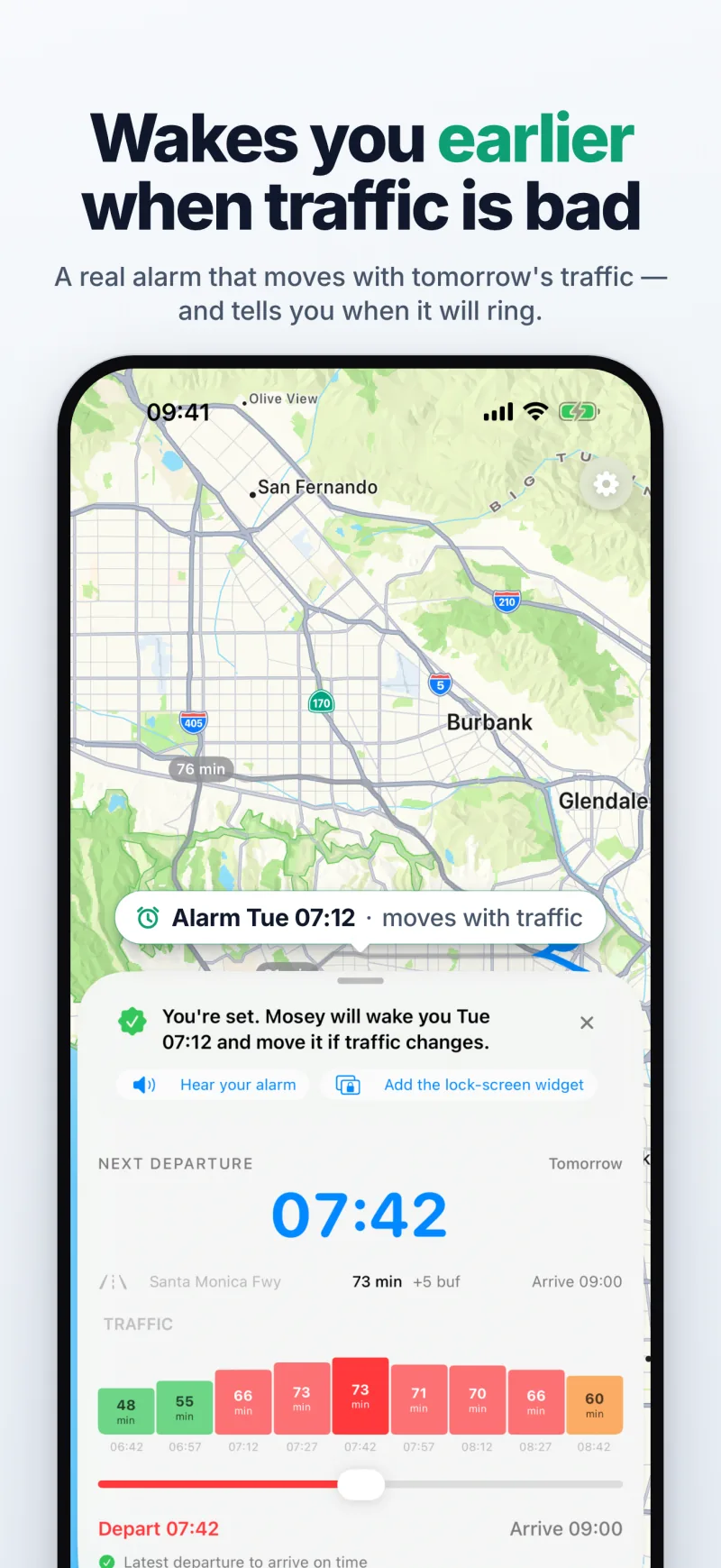
Yes — on iPhone with iOS 26, Mosey's wake-up alarm is set from the drive time on your route and moves when the traffic does. Arrive 09:00, 34 minutes in Monday traffic, a 5-minute buffer: leave 08:21, alarm 30 minutes before that, at 07:51. If live traffic makes the drive longer, it rings earlier — through silent mode and Focus.

A real alarm, not a notification
Mosey's wake-up alarm is an alarm in the iOS sense, built on AlarmKit: it rings through silent mode and any Focus, including Sleep, and keeps ringing until you stop it. A notification, by contrast, plays its sound once, for at most 30 seconds, and is silenced by the ring switch. That is why the alarm needs iOS 26, and why Mosey has no version for earlier iPhones.
You pick one of eight tones — chimes, bells and classical melodies, none of them a one-second beep — and can hear it before the first morning: "Hear your alarm" right after you save your first route, or "Test Alarm" on the route any time later.
How the alarm moves
The alarm is tied to your first reminder: with the default timing it rings 30 minutes before the leave-by. Mosey sets it ahead for your next departure — each time you open the app — from the traffic Apple Maps expects on your route at that hour. On the morning itself, Mosey's server starts checking live traffic about half an hour before the alarm is due, an hour before the leave-by with the default reminders: every 15 minutes, then every 5.
When the drive gets longer, the leave-by moves earlier and the alarm moves with it; when the roads are clearer than expected, both move later. Each move reaches your iPhone as a background update, which iOS can hold back for a while, so the alarm follows the checks that arrive before it rings.
If traffic turns so bad that the new alarm time has already passed, the alarm rings straight away instead of being dropped — the morning the roads are worst is the one the alarm exists for. It is only cancelled once the leave-by itself has gone by.
One alarm, then nudges
By default only your first reminder is an alarm; the later ones — 10 and 2 minutes before you leave, unless you change them — arrive as ordinary notifications. Set a route's "Alarm for" to "Every reminder" if you want each of them to ring until stopped.
It is a setting per route, not per phone: your weekday commute can wake you while a Saturday route only sends notifications.
Snooze, skip a morning, or off
Snooze for 5, 10 or 15 minutes; the snooze button is left out when one more snooze would take you past the leave-by. Working from home tomorrow? Swipe left on the route card and tap "Skip alarm" to skip a single morning without switching the route off — it rings again the day after. And each route can have the alarm fully off if you'd rather have notifications only.
When there is no traffic data
Where Apple Maps has no live traffic for a route, Mosey says so — "Live traffic isn't available for this route" — rather than guess. The alarm then uses the last drive time Mosey actually measured for that route. If it has never measured one, there is no moving alarm at all, and the route card says "No moving alarm until traffic data is available".
What your iPhone already does — and where Mosey differs
Your iPhone already has an alarm that rings through silent mode, and several ways to learn when to leave from traffic — as alerts and notifications. This is what each one does, as Apple and Google describe them in their own help pages as of 9 October 2026 (Sources, below).
Where Mosey differs: it sets a real alarm from each commute morning's traffic, on the days you choose, and moves it when the leave-by moves. In turn, Mosey plans driving routes only, needs iOS 26 and an internet connection for its traffic checks, and doesn't navigate — the Navigate button hands the route to your maps app. How the leave-by itself is worked out is on the page “When to leave for work, from today's traffic”.
- Clock app: an alarm rings at the time you set, on the days of the week you choose, and sounds even in silent mode and with Do Not Disturb or another Focus on. It doesn't look at traffic, so the time stays where you put it.
- Calendar, Time to Leave: when an event has an address, Calendar uses Apple Maps — locations, traffic and transit options — to tell you when it's time to leave. It works per event and arrives as a Calendar alert, not an alarm.
- Apple Maps: Leave at or Arrive by estimates the travel time for a future departure or arrival from predicted traffic. For a route you drive regularly, such as home to work, Maps may show it as "Your route" and alert you to delays before you leave.
- Google Maps: you can set a departure or arrival time for a route with one destination, based on estimated traffic, and on iPhone set a reminder to leave for a trip, which comes as a notification.
- Waze, Plan a drive: you choose the day and time you want to arrive, and Waze reminds you when it's time to leave from real-time traffic and your location — notifications an hour and a half and 10 minutes before, or only 10 minutes before.
- Shortcuts: a personal automation can run at a time of day on the days you choose; what it does depends on the steps you build yourself, such as looking up a travel time and setting an alarm. iOS asks before it runs unless you set it to run without asking.
| What it does | Rings as an alarm | On your commute days | Follows the morning's traffic | |
|---|---|---|---|---|
| Clock alarm | Rings at a time you set | Yes | Yes, the days you choose | No |
| Calendar: Time to Leave | Says when to leave for an event | No, an alert | For each event with an address | Yes |
| Apple Maps | Travel time for a time you pick | No | No | Predicted traffic; delay alerts |
| Google Maps | Leave or arrive time; reminder | No, a notification | Per trip | Estimated traffic |
| Waze: Plan a drive | Reminds you when to leave | No, notifications | Per planned drive | Yes, real-time traffic |
| Shortcuts automation | Runs steps you build | If your steps set one | Yes, the days you choose | Only when it runs |
| Mosey | Leave-by and wake-up alarm | Yes | Yes, the days you choose | Yes, expected then live |
Sources (9 October 2026)
- Apple: Set an alarm in Clock on iPhone
- Apple: Create and edit events in Calendar on iPhone (time to leave)
- Apple: Change your Calendar settings on iPhone (Time to Leave)
- Apple: Get driving directions in Maps on iPhone (Leave at, Arrive by, Your route)
- Google Maps Help: Get directions & show routes (iPhone & iPad)
- Google Maps Help: Plan your commute or trip (iPhone & iPad)
- Waze Help: Plan a drive (iPhone & iPad)
- Waze Help: Get a reminder when it's time to leave (iPhone & iPad)
- Apple: Event triggers in Shortcuts (Time of Day)
- Apple: Intro to shortcuts with automations
Frequently asked questions
Does the alarm ring when my iPhone is on silent or in Sleep Focus?
Yes. It is an AlarmKit alarm, not a notification, so it sounds through the ring switch and every Focus mode, and keeps ringing until you tap Stop.
Does it move later when the roads are clear?
Yes. When the morning's live checks find the drive shorter than expected, the leave-by moves later and the alarm follows it, as long as the update reaches your iPhone before the alarm rings. Your buffer and reminder times stay as you set them.
Which iPhones does it need?
Any iPhone on iOS 26 or later. Mosey requires iOS 26 and isn't available for earlier versions.
Can I keep my normal alarm too?
Yes. Mosey's alarm is separate from the alarms in the Clock app and doesn't change them. Keep a fixed alarm as a floor if you like, and let Mosey ring earlier when it has to.
Does the app need to be open overnight?
No. The alarm is handed to iOS when it is set, and moves arrive as background updates from Mosey's server. Each time you open Mosey it sets the alarm for your next departure; if you haven't opened it since the last one, the alarm is set that morning, when the server starts checking the traffic.