
Your Mac's files and clipboard on your iPhone
Updated · TIT
The file you need is on the Mac at home; the thing you copied is on the Mac's clipboard; the photo you just took belongs in a project folder. Pim joins the two from anywhere: your Mac's files and clipboard history are on your iPhone, and anything on your iPhone can go straight into a folder, or onto the clipboard, on the Mac.
Browse and search your Mac
Files in the Remote tab opens your Mac's home folder, with Desktop, Downloads, Documents and iCloud Drive one tap away. Sort by date or name, show hidden files, or search: the search runs on the Mac with Spotlight, so it finds what Finder would.
Tap a file to open it on your iPhone, then share it or save it to Photos or Files. Press and hold for Open on Mac, Show in Finder or Share; a folder is shared as a zip.
Send files to the Mac
The + button sends photos, videos, files or what's on your iPhone's clipboard into the folder you're looking at. From any other app, share to Pim and choose Save to Mac Desktop or Copy to Mac Clipboard.
And the other way round: on the Mac, right-click a file and choose Quick Actions → Send to Pim, and it's waiting on your iPhone.
Your Mac's clipboard history, on your iPhone
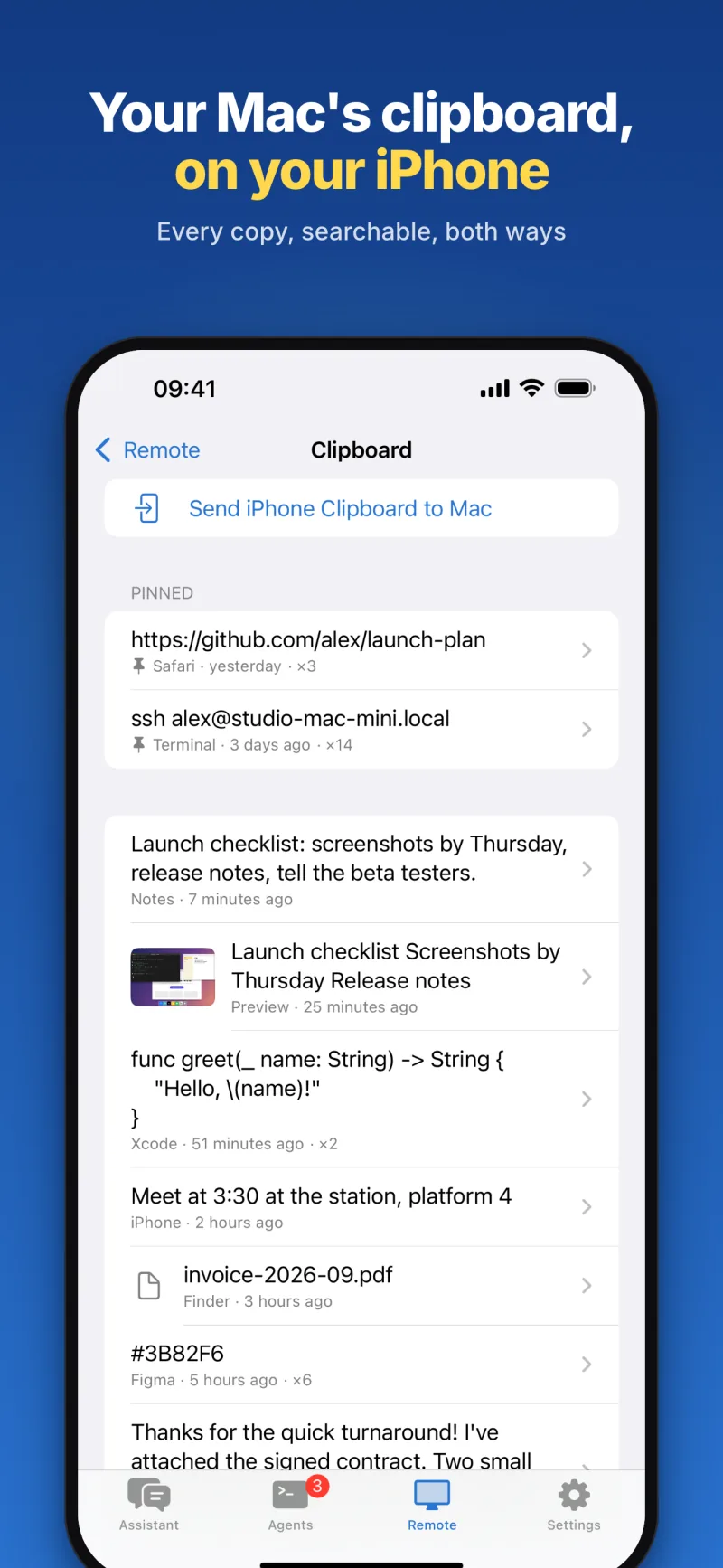
Pim for Mac can keep a clipboard history — turn it on in its settings, and ⇧⌘C on the Mac opens it to search and paste. Pim on your iPhone can look through the same history: pinned items first, then everything you've copied, with the app it came from, when, and how many times. Pictures come with the text found in them, so a screenshot can be found by its words.
- Copy any item to your iPhone, or put it back on the Mac's clipboard, ready to paste
- Pin what you use often, and delete what you don't want kept
- Search the whole history; the search runs on the Mac
- With the history off, Pim still shows what's on the Mac's clipboard right now
Your iPhone's copies, on the Mac
Send iPhone Clipboard to Mac puts what you copied on the iPhone onto the Mac's clipboard, ready to paste there. With Save iPhone Copies to Your Mac turned on (Settings → On This iPhone), what you copy on the iPhone joins the Mac's history each time you open Pim — iOS lets an app read the clipboard only while it's open.
What passes through, and what's kept
Files you move between iPhone and Mac only pass through Pim's server: they're deleted as soon as they arrive, and at the latest after a day. Clipboard items are relayed, not stored. The clipboard history itself is kept only on your Mac, by Pim for Mac.
Frequently asked questions
Can I reach any folder on my Mac?
Your home folder and everything in it, including iCloud Drive. A few sensitive locations stay out of reach from the phone.
Is my clipboard history uploaded?
No. It's stored only on your Mac. Your iPhone reads it through Pim's server when you open it, and the server doesn't keep it.
Can I send a whole folder?
From the Mac, yes: share a folder from the file browser and it arrives as a zip. From the iPhone you send photos, videos and files.
What do I need?
An iPhone with iOS 18 or later, and a Mac with Apple silicon and macOS 14 or later running Pim for Mac, a free download from pim.titdev.nl/mac.