
Claude Code and Codex on your iPhone
Updated · TIT
Claude Code and Codex work in a terminal on your Mac — which is a problem when you're not at it. A long task stops to ask for permission and waits until you're back. Pim puts those sessions on your iPhone: start one in any folder, follow every step, answer its questions, read the diff and ship it, while the agent and your code stay on your Mac.
How it works
Pim for Mac, a free menu bar app, runs Claude Code or Codex on your Mac for you — the same command-line tools you use at your desk, under your own account. Pim on your iPhone reaches it through Pim's server, so it works from anywhere with a connection, not only on your home network.
Each turn is a real run of the agent in the folder you picked. While it works, a Live Activity on the Lock Screen and in the Dynamic Island shows the current step; when it finishes or needs you while you're away from the Mac, your iPhone gets a notification that opens the session.
Start a session
Tap + in the Agents tab, write what you want done, and send. Above the text box you pick the folder — a recent project, any folder in your home folder, or a path you type — and, if you've paired more than one Mac, which Mac. The model menu lists Claude Code's models and, where Codex is installed, Codex's, each with how hard it should think, from low to max.
Attach photos or files with +: a screenshot of a bug, a design, a log. They're copied to the Mac and handed to the agent with your message.
Approve from anywhere
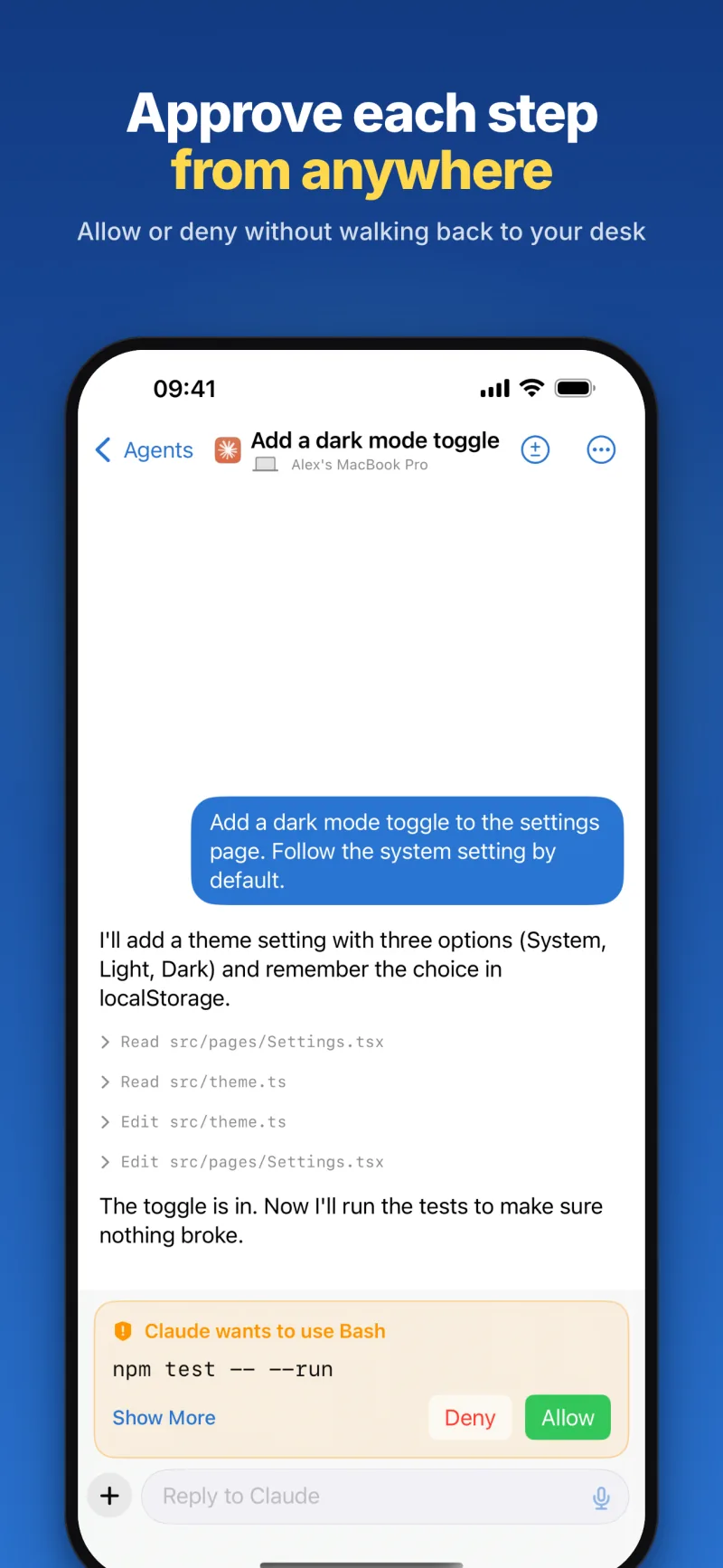
Claude Code asks before some actions — running a command, say — and in a terminal it waits for you to type an answer. With Pim the question comes to your iPhone: an orange card in the session, a notification with Allow and Deny, and the same buttons on the Live Activity. Allow from a notification needs the iPhone unlocked first, so nobody can approve anything from your Lock Screen. Answer in one place and the others clear.
Ask for a plan first, and Claude Code shows it when it's ready — "Claude's plan is ready" — before it touches a file. Read it, then Approve, or tap Keep Planning and say what should change.
Codex sessions don't ask along the way. Codex runs in its sandbox, where it can change files in the session's folder and use the network, and you follow every step as it goes.
Review the changes and ship them
The ± button opens the session's uncommitted changes: each file with the lines added and removed, and its diff in colour. At the bottom, Commit, Commit & Push and Open Pull Request ask the agent to do it, and it writes the commit message itself.
Under every turn Pim shows the model, the tokens, the time and an estimated cost at API prices; the session's menu has the total.
Back at your desk
Open in Terminal on Mac picks the session up in Ghostty, iTerm or Terminal on the Mac, with the conversation where you left it (claude --resume, or codex resume). Or copy the command and run it yourself. You can still reply from your iPhone afterwards.
Sessions on a schedule
A scheduled agent session starts on its own — once, every day, on the weekdays you pick, or at a set interval — in the folder and with the model you chose. Three templates get you going: update the dependencies, run the tests every night, review the code every week. If the Mac is asleep at the time, the session starts when it's back, up to 12 hours later, and asks you, as any session does, when it needs you.
What you need
Pim is an independent app by TIT and is not affiliated with Anthropic or OpenAI. Claude Code is Anthropic's and Codex is OpenAI's; Pim runs the copy on your Mac, and their terms apply.
- An iPhone with iOS 18 or later
- A Mac with Apple silicon and macOS 14 or later, with Pim for Mac installed (free, from pim.titdev.nl/mac)
- Claude Code or Codex installed and signed in on that Mac, with your own account
- The Mac switched on and online while you work — Stay Awake in the Remote tab keeps it from sleeping
Frequently asked questions
Do I need an API key?
No. Pim runs the Claude Code or Codex already set up on your Mac, signed in the way you set it up — with a subscription or an API key. Pim never asks for your key and doesn't keep it.
Does Pim show sessions I started in a terminal?
No: Pim lists the sessions started from Pim. The other way round works — a Pim session can be continued in Terminal on the Mac, and you can still answer it from your iPhone.
What happens if my Mac goes to sleep?
A sleeping Mac can't be reached, so a session can't start or go on. Stay Awake keeps it awake for 1, 3 or 8 hours or until you stop it — with the lid closed too, once you've allowed Pim in System Settings → General → Login Items. Scheduled sessions wait up to 12 hours for the Mac to come back.
Is my code uploaded anywhere?
Your code stays on your Mac. When you open a session, the app reads the conversation, the steps and the diff from the Mac through Pim's server, which passes them on without storing them. Attachments you send are deleted from the server after 7 days.